
Built for the RAD Studio Workflow
Kai is not a generic AI window placed next to your IDE. It is integrated into RAD Studio so developers can stay close to the source code, designers, compilers, and project structure they already use.
What's New in Kai 1.1
New AI integrations
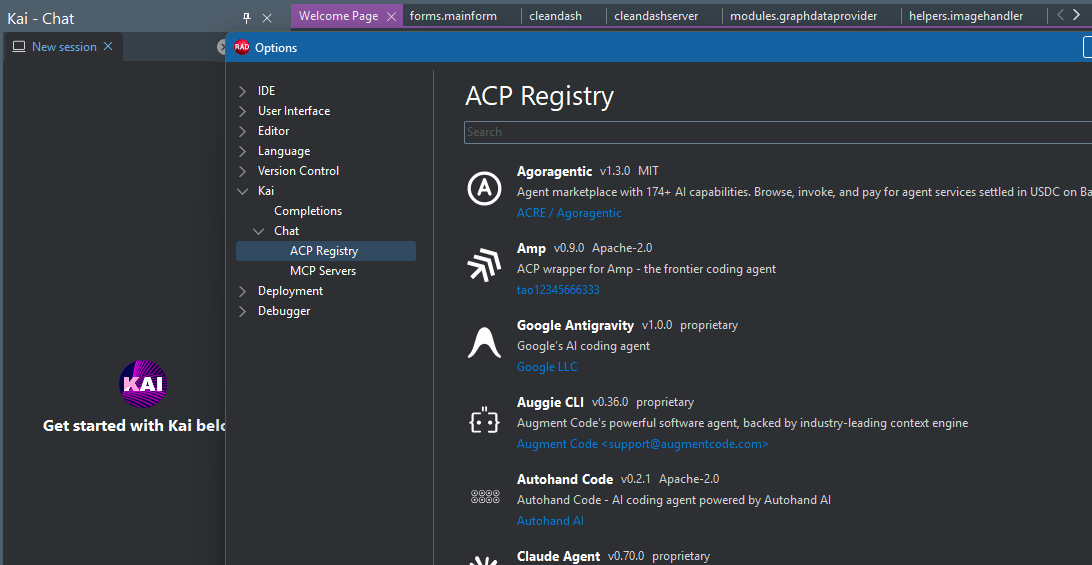
Access 40+ AI agents through the ACP Registry, including existing integrations like Claude, GPT-5 and Gemini CLI, and newer options such as Antigravity, Grok, Mistral, Cursor, Devin, Kilo Code, and Junie.
Agent management
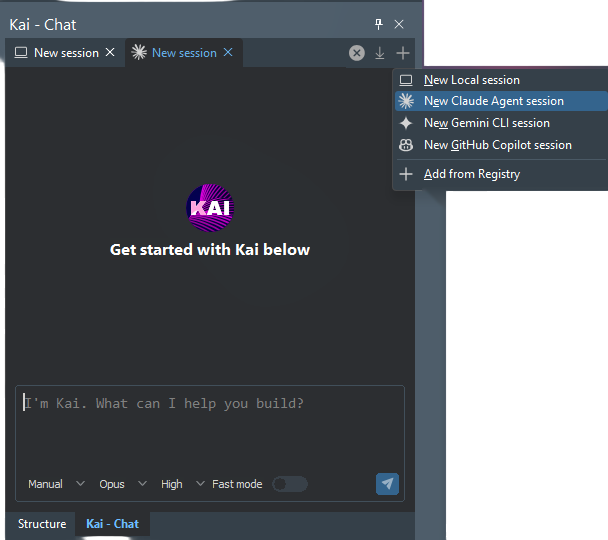
Search, install, and update supported AI agents directly from Kai, with new ACP Registry agents becoming available without requiring a Kai update.
UI
Enjoy a redesigned Kai experience with improved spacing, monochrome icons, a new chat toolbar, cleaner configuration pages, and more consistent controls.
Local AI
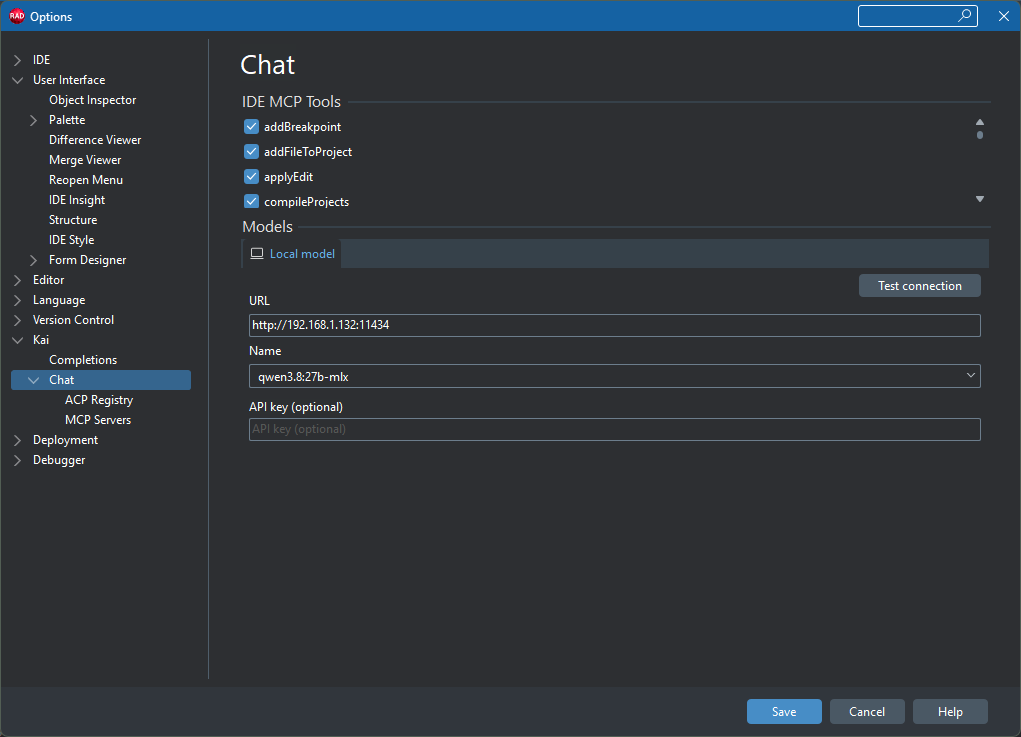
Use the new Native LM Studio ACP agent to work more smoothly with local models through both LM Studio and Ollama.
Sessions
Session handling now runs through ACP, with an Import Sessions option for bringing active-engine sessions into the Kai chat environment.
Improved Authentication
Authentication is improved and reworked to be handled through ACP-based authentication and OAUTH support, allowing supported login methods to be pulled directly from each connected AI agent.
Quality
Kai 1.1 addresses numerous customer-reported issues affecting chat behavior, scrolling, popups, performance, UI responsiveness, authentication, and model availability.
More Than Autocomplete
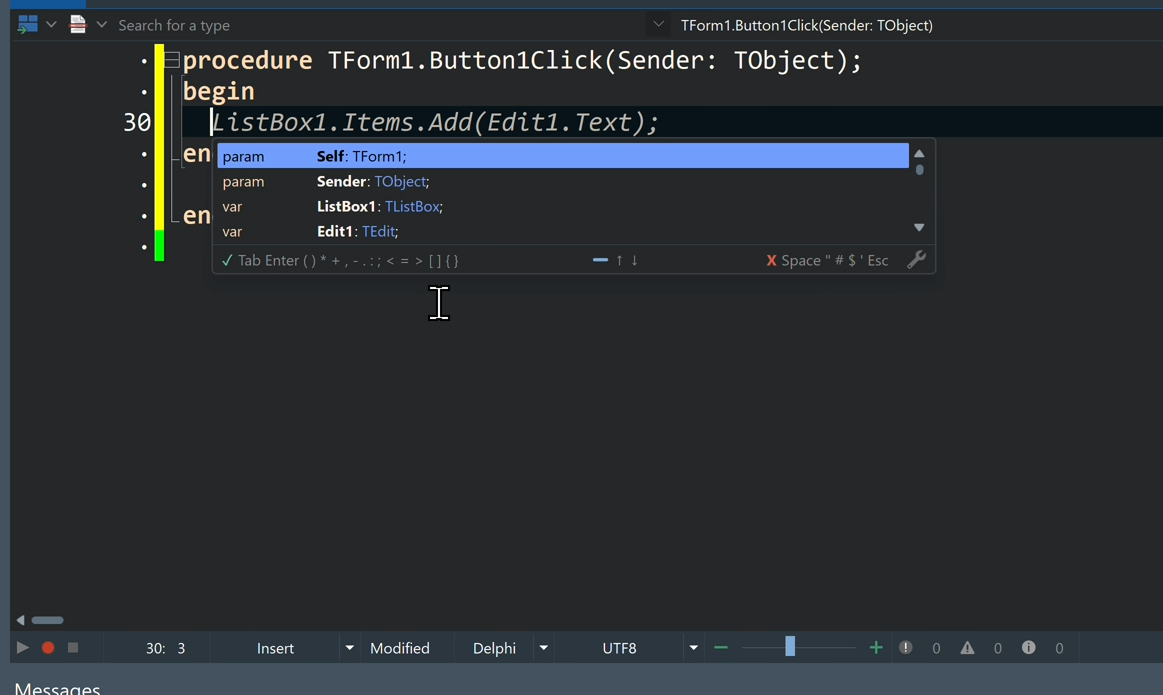
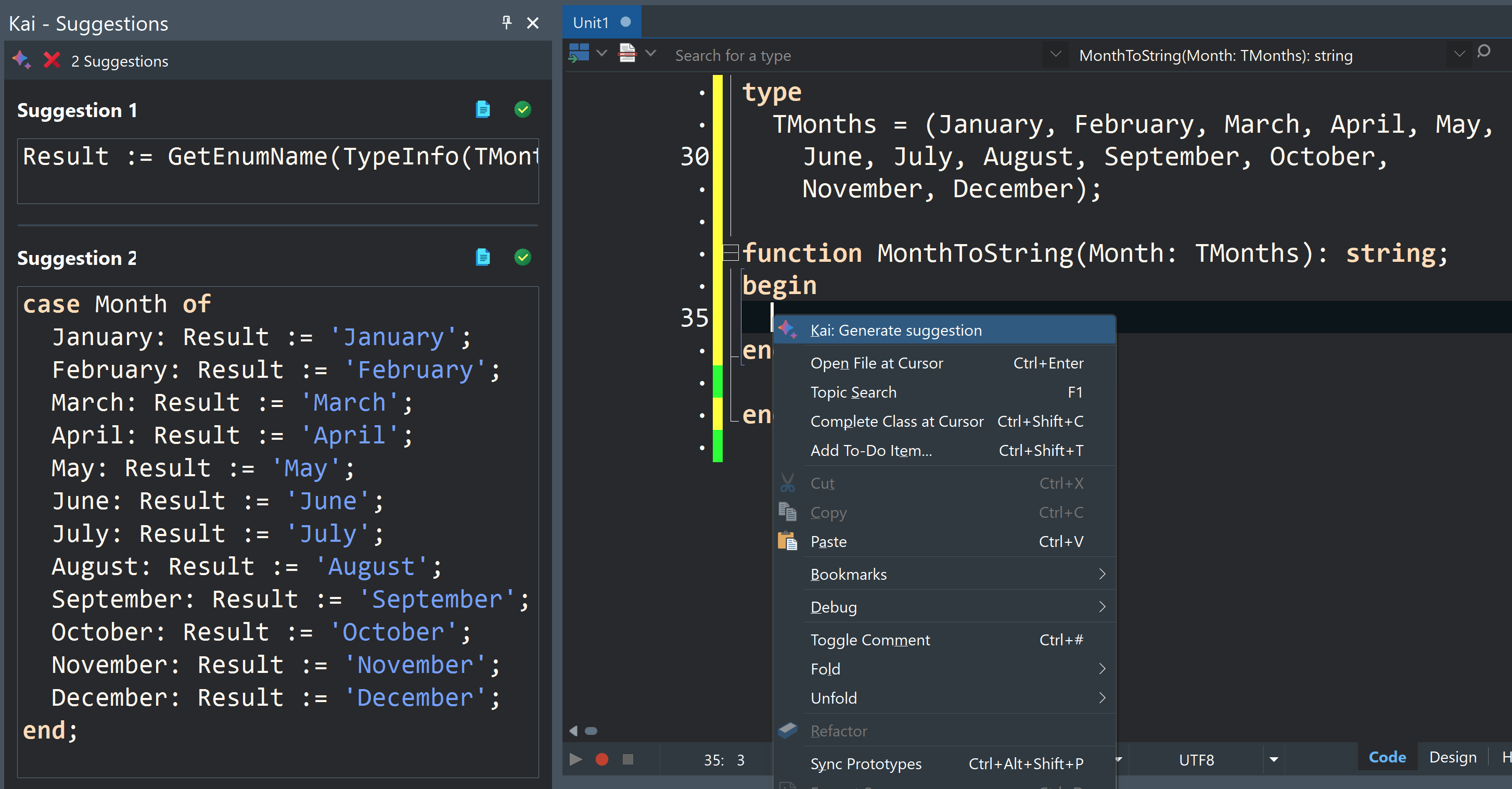
Kai combines inline AI suggestions, a dockable Agent Chat window, project-aware context, and MCP-powered workflows. Ask for help, review suggestions, apply changes, build the project, inspect compiler output, and move forward without jumping between disconnected tools.
Kai helps you:
- Complete code inline with Ghost Text
- Use AI suggestions inside RAD Studio CodeInsight
- Compare multiple code options in Panel Completions
- Chat with an AI agent that understands project context
- Generate UI forms and configure controls
- Compile projects and review compiler messages
- Fix errors and warnings with guided AI assistance
- Refactor and modernize existing Delphi and C++Builder code
Autocomplete is useful. Kai goes further.
Why Kai with RAD Studio?
RAD Studio already gives developers a proven native application development platform: VCL for Windows, FMX for cross-platform UI, visual design, native compilers, FireDAC data access, RAD Server, WebStencils, and support for desktop, mobile, server, and web-connected applications. Kai adds agentic AI to that environment so developers can move faster without abandoning the platform.
Stay in flow
Work entirely within RAD Studio; turn prompts into working code, builds, and fixes without disrupting your momentum.
Smarter coding, built in
Boost productivity with AI-powered inline autocomplete and rich code suggestions that feel like a natural extension of your editor.
Generate UIs, working prototypes and apps
Describe your idea and let Kai instantly create ready-to-use platform-native interfaces, interactive prototypes, and functioning applications.
Modernize your code
If you have an existing application, Kai can help you modernize the code and UI and help refactoring existing codebases, leveraging new language and framework features.
Model flexibility without lock-in
Access 40+ AI agents through the ACP Registry, including Claude, GPT-5, Gemini CLI, Antigravity, Grok, Mistral, Cursor, Devin, Kilo Code, and Junie.
Enterprise-ready by design
No proxy layer via Embarcadero servers. No mandatory cloud dependency . Your code stays under your control, with local storage and direct model communication.
Local Models for Maximum Protection
When privacy matters most, run Kai fully offline with local LLMs for maximum IP protection and compliance.
Choose the Model That Fits
Kai 1.1 gives developers more flexibility to choose the AI tools that fit their workflow. With the new ACP Registry integration, Kai provides access to 40+ AI agents, including familiar options like GitHub Copilot, OpenAI, Anthropic Claude, Google Gemini CLI, and additional agents such as Antigravity, Grok, Mistral, Cursor, Devin, Kilo Code, and Junie. Agents can be discovered, installed, and updated directly through Kai, while new options can become available through the registry without requiring a new Kai release.
For developers who prefer local AI, Kai 1.1 also introduces the new Native LM Studio ACP agent, supporting both LM Studio and Ollama. This provides additional flexibility for development workflows where local models are preferred.
Designed for Source-Code Control and Privacy
Kai gives developers a practical path to AI-assisted development without giving up control. You can review every suggestion, keep chat sessions local, work with local AI models, and choose the model path that fits your team’s data policy. Local model support means code and conversations can stay on your machine or network infrastructure.
Built for Modernization and Migration
Many RAD Studio developers are not starting from a blank file. They are maintaining, upgrading, and extending important existing Delphi and C++Builder applications.
Kai can help explain the code you already have, suggest refactors, update UI patterns, assist with modernization tasks, and support migration work. Paired with RAD Studio 13.1, teams can also take advantage of newer platform support, Windows 11 VCL styles, Windows on Arm support, Android API 36.1, iOS 26 support, DelphiLSP LSIF, and updated web tooling.
Built for an Expanding AI Ecosystem
Kai 1.1 makes it easier to bring the AI tools you want directly into your RAD Studio workflow. Start a new session with an installed agent, switch between different AI options based on the task, or discover and add more agents through the ACP Registry. With access to 40+ agents and a registry designed to expand as new options become available, your AI development environment can evolve without being tied to a fixed set of integrations. Kai brings that choice together in one consistent experience inside RAD Studio, helping developers spend less time managing separate AI tools and more time building, improving, and modernizing applications.
What Kai Adds to Your Workflow
Writing code
Inline suggestions, Ghost Text, CodeInsight completions
Reviewing options
Panel Completions with multiple alternatives
Understanding a project
Agent Chat with project context and file references
Building
Compile workflow from inside the IDE
Fixing errors
Compiler output analysis and suggested fixes
Modernizing
Refactoring, UI updates, and migration assistance
Extending workflows
Integration with external tools and context
How to Try Kai
Have a named user (non ELC) license for RAD Studio 12 or 13?
Download Kai through GetIt or the Customer Portal and redeem your Kai Trial license on the Redemption Page
Kai Trial Redemption PageHave a Network or Concurrent license w/ Active Maintenance?
Contact Sales to get your Kai Trial license.
Contact salesI'm a new customer or a customer without a recent license
Install and try the latest RAD Studio edition. Your RAD Studio Trial will include a Kai Trial.
Get RAD Studio TrialHow to Buy Kai
I am a Customer With Maintenance
If you have a RAD Studio, Delphi or C++Builder license that is current on Support & Maintenance: Contact sales and request a new Kai license.
Contact salesI am a Customer Without Maintenance
If you have a RAD Studio, Delphi or C++Builder license that has expired Support & Maintenance: Contact sales to activate your subscription and acquire your Kai license.
Contact salesI Don’t Have a License Yet
You can buy a Kai subscription along with a new RAD Studio, Delphi, or C++Builder license, by selecting the option in the Web Store or by contacting sales when purchasing a new license.
Buy NowKai 1.1 FAQs
Kai 1.1 introduces a significant architectural update centered around the Agent Client Protocol (ACP) Registry. AI integrations are now downloaded from the public ACP Registry rather than being bundled directly with Kai. This gives users access to a growing ecosystem of AI agents which already has a huge collection of 40+ agents currently available, including new options such as Antigravity, Grok, Mistral, Cursor, Devin, Kilo Code, and Junie. More are being added regularly. Kai 1.1 also introduces a redesigned user interface, improved chat quality, expanded local AI support, and numerous usability improvements.
The ACP Registry is a public registry of AI agents that Kai 1.1 uses to manage its integrations. Instead of shipping with a fixed set of integrations, Kai can discover and install agents from the registry. Users can search for agents, install them, and receive updates when newer versions become available. New agents can also become available through the registry without requiring a new Kai release.
Kai 1.1 currently provides access to 40+ AI agents through the ACP Registry. The registry includes agents previously supported by Kai as well as newer options such as Antigravity, Grok, Mistral, Cursor, Devin, Kilo Code, and Junie. The registry is expected to grow as additional agents become available.
Yes. Kai 1.1 introduces a Native LM Studio ACP AI agent. Despite its name, this agent supports both LM Studio and Ollama, providing expanded support for local AI engines.
Kai 1.1 introduces an extensive UI refresh, including monochrome icons and glyphs, improved spacing, a new chat toolbar, cleaner configuration pages, a more consistent editing-area appearance, and new checkbox controls for Boolean options. The changes are designed to make Kai's features easier to discover and use while bringing the interface more in line with RAD Studio's UI and behavior.
Open the ACP Registry configuration page in Kai and search or filter the available agents. Select an agent and click Install. Binary agents can be automatically downloaded and extracted. Agents distributed through NPX or UVX may require additional confirmation and the corresponding underlying technology, such as Node.js or Python, to already be installed.
No. Kai 1.1's ACP Registry architecture allows agents to be added independently of the Kai installation. New agents can become available through the registry without requiring a new Kai release. Installed agents can also be updated directly when newer versions become available.
Kai 1.1 introduces architectural changes that can create compatibility issues with configurations and third-party CLI versions used with Kai 1.0.x. Existing users should review the migration guidance before upgrading. For example, an OpenAI Codex integration compatibility issue involving SQLite can be resolved by deleting the .codex folder under the user account and starting again.
The migration documentation is available here.
Kai 1.1 addresses numerous customer-reported and internal issues, particularly around the chat experience. Improvements address issues involving unwanted popups, chat scrolling, command-palette behavior, performance with larger texts, UI responsiveness during agent reasoning, model availability, authentication messaging, and other chat-related problems.
Kai 1.1 moves session loading and authentication to ACP. Sessions are no longer pre-loaded; users can use the new Import sessions function to bring sessions from the active engine's working directory into Kai. Authentication methods are also obtained directly from the agent.